

When Google Forms is the right fit
Google Forms has real strengths, and we won't play them down. There are several situations where Google Forms remains the better choice:
- For simple forms with no setup. Sign-up for a team event, room booking, a quick question to colleagues: Google Forms is online within minutes, free, and familiar. You don't need a survey platform for that.
- When your team works in Google Workspace and Google Sheets is where analysis happens. Responses land live in Sheets, several people edit the form and the table at the same time, and formulas and pivot tables are well established. This workflow is structurally simpler with Google.
- For quizzes and knowledge checks. The quiz mode with answer key, points, and feedback is built right in and is well established in many schools and universities.
- When identification is intended. For internal Workspace queries where linking the response to a person is desired, the Google account removes the need for any respondent management.
Use QUESTIONSTAR when...
QUESTIONSTAR comes in where simple forms are no longer methodologically sufficient: for studies, employee surveys, and market research whose results are analyzed and presented in a defensible way.
- ...when your questionnaire needs quotas, block randomization, loops, or language versions with shared analysis. QUESTIONSTAR: branching with multiple conditions, quotas per respondent segment, block randomization, loops, and several language versions in one questionnaire with shared analysis, in all plans. Google Forms: section-based branching, shuffling questions and answer options, automatic closing by date or number of responses. Quotas per segment, block randomization, and loops are not documented; multilingual surveys can only be handled through separate forms or duplicated sections.
- ...when you want to analyze directly in the tool. QUESTIONSTAR: filters by answer variables, crosstabs, group comparisons across filter segments, t-tests, and other significance tests where methodologically sensible. Google Forms shows a summary with charts per question; deeper analysis happens in Google Sheets or Looker Studio. That works, but it's a separate step.
- ...when your report should be ready directly as an editable Office file. QUESTIONSTAR exports finished analysis reports as native Word, PowerPoint, and Excel objects with editable charts and tables, plus PDF. With Google Forms the report is built manually from charts and Sheets data.
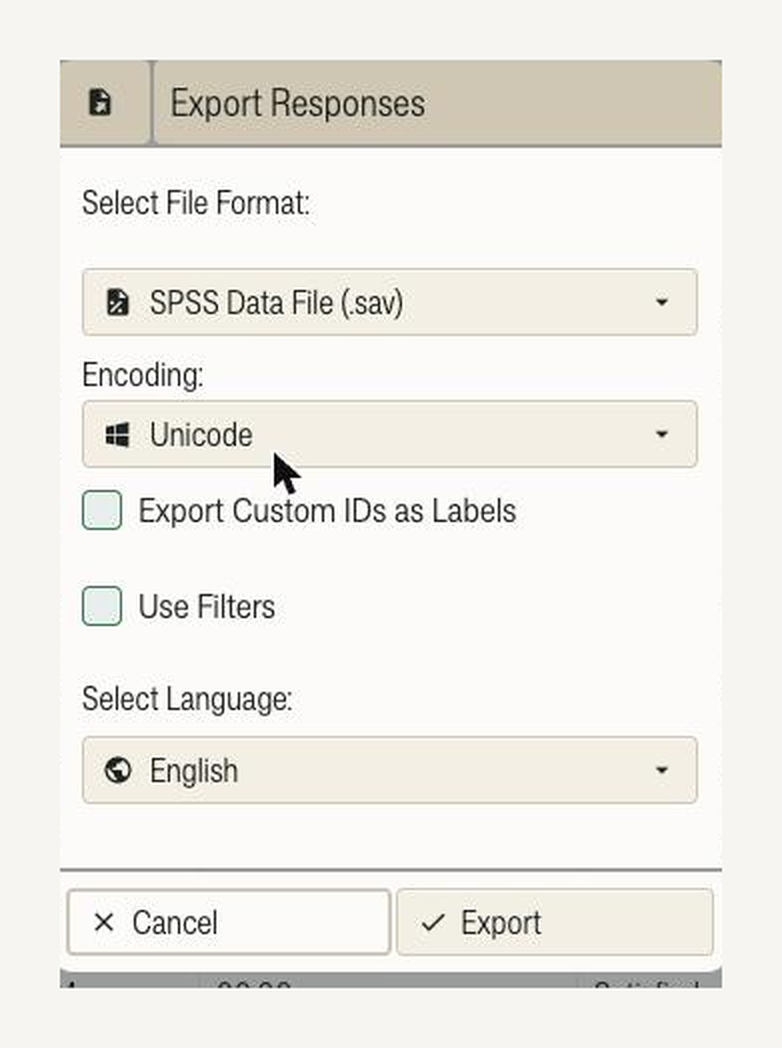
- ...when SPSS export with full metadata is the deciding factor. QUESTIONSTAR exports SPSS (.sav) in all plans, including Free and STUDENT, with variable names, variable labels, value labels, and measurement level. Google Forms exports to Google Sheets and CSV; labels and measurement level are added later in SPSS. For both, we recommend a test export.
- ...when you want to protect small analysis groups. QUESTIONSTAR: minimum number of respondents per analysis group, private questions, one-way enforcement, DPA by download; participation without an account, as with Google Forms. This reduces the risk of conclusions about individuals, for example in small departments. According to Google Help, Google Forms does not capture usernames when email collection is off; a protection threshold for small groups in analysis is not documented.
Feature comparison
Point by point, without marketing language. Note: the comparison is with Google Forms in Google Workspace. Differences for private Google accounts are noted.
| Criterion | QUESTIONSTAR | Google Forms |
|---|---|---|
| Price | Free with all survey features; paid plans from MONTHLY €59/month, PROFESSIONAL €995/year. | Free with a personal Google account; included in Workspace licenses |
| Questionnaire logic | Branching with multiple conditions, quotas per segment, block randomization, loops | Go to section based on answer, shuffling questions and answer options, closing by number of responses; quotas per segment, block randomization, loops not documented |
| Multilingual questionnaires | One questionnaire, several language versions, shared analysis | No built-in feature; separate forms or language selection with duplicated sections |
| Built-in analytics (filters, crosstabs, group comparisons, significance tests) | Yes, in all plans | Summary with charts per question; further analysis in Google Sheets or Looker Studio |
| Analytical reports as editable Office files | Word/PowerPoint/Excel with editable charts + PDF | Not provided; report is created manually |
| SPSS export (.sav) with labels and measurement level | Yes, in all plans | Not documented; export to Google Sheets and CSV |
| Anonymity protection in analysis | Minimum number of respondents per group, private questions, one-way enforcement | Without email collection, no usernames; sign-in required for "Limit to 1 response", organization restriction, file upload; protection threshold not documented |
| Respondent sign-in | Participation without an account | Public forms without sign-in; when sign-in is required (1 response per person, organization restriction, file upload), via Google account; Workspace accounts may be federated via an external identity provider |
| SSO for user accounts | University SSO (eduGAIN and national federations such as InCommon, UKfed, SWITCHaai, DFN-AAI) from CHAIR on request, included in CAMPUS; SSO/SAML from PROFESSIONAL as an add-on, included in CUSTOM | Google account; can be federated via SAML in Workspace; no direct eduGAIN connection |
| Whitelabel / custom branding | Whitelabel from MONTHLY (academic from CHAIR), your corporate design | Color, background, header image, font; the Google domain remains; embedding via iframe |
| Data location | IONOS Germany, in every plan | Data Regions (storage location at rest, e.g. EU) from Business Standard / Education Standard via admin configuration; not selectable for personal accounts |
| Data protection contract basis | DPA for every customer on every plan, downloadable; sub-processor list public | Workspace: Cloud Data Processing Addendum; personal accounts: consumer terms |
| AI and agents | Native MCP server for AI agents on all plans | Gemini in Workspace (form creation, summaries); Workspace MCP server (Developer Preview) for Drive, Sheets and others, no dedicated Forms MCP server; Forms API |
| Quiz mode with scoring | Not as a dedicated mode | Yes, built in |
| Google Sheets connection | CSV/Excel, API, Zapier, n8n | Native, live linked |
See sample exports: View sample .sav · Screenshot of QS export dialog · Sample Office report (PPTX)
Migration: AI import via MCP
Google Forms offers a print view (PDF), a public form link and the Google Forms API for a JSON export of the form structure. QUESTIONSTAR currently has no dedicated Google Forms importer; the AI-based MCP path handles the reconstruction.
Path: AI import via MCP
- Print the Google form as a PDF, share the form link, or export the structure as JSON via the Google Forms API.
- Hand the PDF, link or JSON to an AI agent (Claude, ChatGPT, Cursor and others) with the QUESTIONSTAR MCP server.
- The AI reconstructs question texts, answer options, sections and branching in QUESTIONSTAR. You check, adjust if needed, and publish.
Limit of reconstruction: what gets imported is what is contained in the material you provide; branching targets and validations are more complete in the JSON export than in the print view. Quiz points, Apps Script automations and Sheets formulas are not transferred. Separate forms per language can be merged into one multilingual questionnaire; you check the mapping in the review step.
How long it takes depends on complexity. For larger form inventories we offer a guided migration service.
For ongoing data collection a clear cut-off date makes sense: close running forms in Google Forms, start new waves in QUESTIONSTAR. You export previous responses as CSV from Google Sheets and, if needed, import them into QUESTIONSTAR via the MCP path as well.
More on the MCP integration.
For businesses and universities
QUESTIONSTAR covers surveys from a single research group to a large corporation, with all survey features already in the Free plan.
- Hosting: IONOS in Germany (EU), ISO 27001-certified data centers, on every plan. On-premise possible on the CUSTOM plan.
- GDPR: DPA directly downloadable, sub-processor list public.
- Enterprise SSO/SAML: an add-on on PROFESSIONAL, included on CUSTOM.
- University SSO: eduGAIN and national federations (InCommon, UKfed, SWITCHaai, DFN-AAI as the German example) from CHAIR on request, included on CAMPUS. More on University SSO.
- Pricing model: a flat plan fee per concurrently active survey, unlimited responses on paid plans, number of users not price-relevant from PROFESSIONAL onward.
From roughly 30 to 50 concurrently active surveys or individual compliance requirements onward, just talk to us directly. That gets sorted faster by phone or email than through a pricing page.
What Google Forms does better in these situations: zero setup effort, free use, simultaneous team editing, a native live link with Google Sheets, a built-in quiz mode and Gemini features inside Google Workspace.
Your data stays your data
If QUESTIONSTAR should ever stop convincing you, you get your data out in full: as SPSS, CSV or Excel. At any time, without cancellation, without an extra fee, without having to ask. We treat data export as a baseline, not a bargaining chip.
Who is QUESTIONSTAR a good Google Forms alternative for?

For universities and research teams
If your study needs quotas, block randomization or several language versions of a questionnaire with a shared analysis, and the data should land in SPSS with labels: QUESTIONSTAR. Plus University SSO (eduGAIN and national federations, from CHAIR on request, included on CAMPUS) and Academic plans (STUDENT €29/month, CHAIR €895/year). Limit: for course quizzes and short feedback without a methodological claim, Google Forms is often enough.

For HR with anonymity requirements
If results of small departments in employee surveys should only become visible above a minimum group size: QUESTIONSTAR. Private questions, one-way enforcement, DPA by download. Limit: for internal queries with intentional name attribution within Workspace, Google Forms remains the simpler option.

For market research with methodological requirements
If quotas per segment, block randomization and significance tests are standard in your studies: QUESTIONSTAR, with all survey features on every plan and SPSS export with metadata. Limit: for quick mood checks without sample control, a simple form is enough.

For SMEs with a report focus
If customer or employee surveys end in a report for management or the board: QUESTIONSTAR delivers it as an editable Word, PowerPoint or Excel file. Transparent prices up to PROFESSIONAL (€995/year, 10 concurrently active surveys, unlimited users). Limit: if your analysis should stay in Google Sheets, Google Forms is the shorter route.
Common questions when switching from Google Forms
Is Google Forms GDPR-compliant, and what is different with QUESTIONSTAR?
For Workspace customers, Google provides data processing terms; from Business Standard or Education Standard, the storage location can be set via Data Regions. For personal Google accounts, consumer terms apply, and a data processing agreement is not provided there. Whether use is permissible is decided by your organization or your data protection officer on a case-by-case basis. QUESTIONSTAR: hosting at IONOS in Germany on every plan, a DPA for every customer on every plan (including Free) available for download, sub-processor list public, no admin configuration needed.
Google Forms is free. Why QUESTIONSTAR?
Because of the functions, not the price. Even the Free plan of QUESTIONSTAR includes all survey features: quotas, block randomization, language versions of a questionnaire, built-in analytics, SPSS export. Paid plans expand parallel surveys, response volume and number of users. For simple forms, Google Forms remains a good, free choice.
Is QUESTIONSTAR harder to use than Google Forms?
For simple questionnaires, no: create questions, enter answer options, share the link. You use quotas, block randomization or language versions only when you need them. The Help shows every step.
How anonymous are answers in Google Forms?
Without email collection, Google states that no usernames are recorded, even if respondents have to sign in for "Limit to 1 response." For file upload questions, signing in is always required. QUESTIONSTAR additionally protects at the analysis level: a minimum number of respondents per group and private questions reduce the risk that answers in small departments can be attributed to individuals via filters. Free-text answers or rare combinations of characteristics can still allow inferences; that is true for every tool.
How do I get my Google Forms into QUESTIONSTAR?
Via the AI-based MCP path: hand the form as a PDF, link or JSON (Google Forms API) to an AI agent with the QUESTIONSTAR MCP server; question texts, answer options, sections and branching are reconstructed. Previous answers can be imported from Google Sheets as CSV via the MCP path too. Quiz points and Apps Script automations are not transferred.
Can I keep working with Google Sheets?
Yes. You export response data as CSV or Excel; for automated handovers, API, webhooks, Zapier and n8n are available. There is no native live link like the one in Google Forms.
Does QUESTIONSTAR support university SSO (eduGAIN, national federations)?
Yes, from CHAIR on request, included on CAMPUS. With Google Forms, sign-ins go through a Google account; Workspace accounts can be federated via an external identity provider. There is no direct eduGAIN connection. Public Google forms can be filled out without signing in.
When is Google Forms enough, and when do I need QUESTIONSTAR?
Google Forms is enough for registrations, short queries, quizzes and internal forms whose analysis stays in Sheets. QUESTIONSTAR is worth it as soon as quotas, block randomization, language versions of a questionnaire with a shared analysis, significance tests, SPSS data or a finished Office report are needed, or when small analysis groups are to be protected.
Further comparisons
Show all comparisons
- Alternative to Alchemer
- Alternative to easyfeedback
- Alternative to evasys
- Alternative to Jotform
- Alternative to LamaPoll
- Alternative to LimeSurvey
- Alternative to Microsoft Forms
- Alternative to Netigate
- Alternative to Qualtrics
- Alternative to Questback
- Alternative to QuestionPro
- Alternative to SoSci Survey
- Alternative to SurveyHero
- Alternative to SurveyMonkey
- Alternative to Survio
- Alternative to Tivian
- Alternative to Typeform
- Alternative to Unipark
Google, Google Forms, Google Workspace, Google Sheets, Looker Studio and Gemini are trademarks of Google LLC. QUESTIONSTAR is an independent provider and is neither affiliated with Google LLC nor sponsored or authorized by Google. These names are used for product identification (nominative use). All comparative statements refer to publicly available product information as of the last review on October 21, 2026.